Connect and operate a worker
A worker is your own machine running the DataHub agent and Docker. It connects outbound to the DataHub gateway to receive authorized jobs and deliver results.
Prepare the machine
Connect a workstation or server when you want to run training and model operations on hardware you control. The app keeps the experiment and its outputs attached to the project; the worker supplies compatible compute.
Several workers can run separate jobs or sweep trials. Connecting them does not automatically distribute a single training run across machines.
- Use Python 3.10 or newer and a working Docker installation.
- For CUDA jobs, install a compatible NVIDIA driver and NVIDIA Container Toolkit.
- Keep enough persistent disk for datasets, environments, checkpoints, and pending outputs.
- Allow outbound HTTPS to your DataHub gateway and the network access needed to obtain the selected container environment.
Workers can connect from behind a firewall through outbound connections, without PortHub or an inbound public worker port. Configure restrictive firewalls or proxies to permit those connections.
Install and connect
- Open Settings and its Workers section.
- Use the displayed install command for your current DataHub deployment.
- Follow the credential prompt and registration instructions. Keep the worker credential private.
- Confirm the worker appears and that its software and hardware report is current.
- Resume job claiming when you are ready to use the machine.
Use a distinct named installation when connecting the same machine to another deployment. Do not reuse credentials across deployments or overwrite an unrelated worker service.
Select a compatible environment
Check your connection
After installation, the worker should appear in Settings with a recent heartbeat. Open its details to inspect its software and CPU, RAM, disk, and GPU report. An online worker can remain idle until a compatible job is assigned.
The worker advertises supported environments and device capabilities. Reviewed recipes can use prebuilt images; an uncached environment may require a download and additional disk. A cached image does not eliminate space needed for writable output.
CUDA support depends on the driver, architecture, device, container runtime, and recipe. CPU availability does not imply that a GPU recipe has a CPU fallback. Unsupported hardware or missing capabilities can keep a job ineligible.
The reviewed CUDA 13.2 training images require NVIDIA compute capability 7.5 or newer. DataHub checks the selected GPU and the pinned environment recipe before admission. Worker 0.2.12 repeats the architecture check before staging or starting a container; an unknown capability waits for a verified report. Update an idle worker when the resource report requests this capability. Existing running containers are not restarted by the check.
Read the resource report
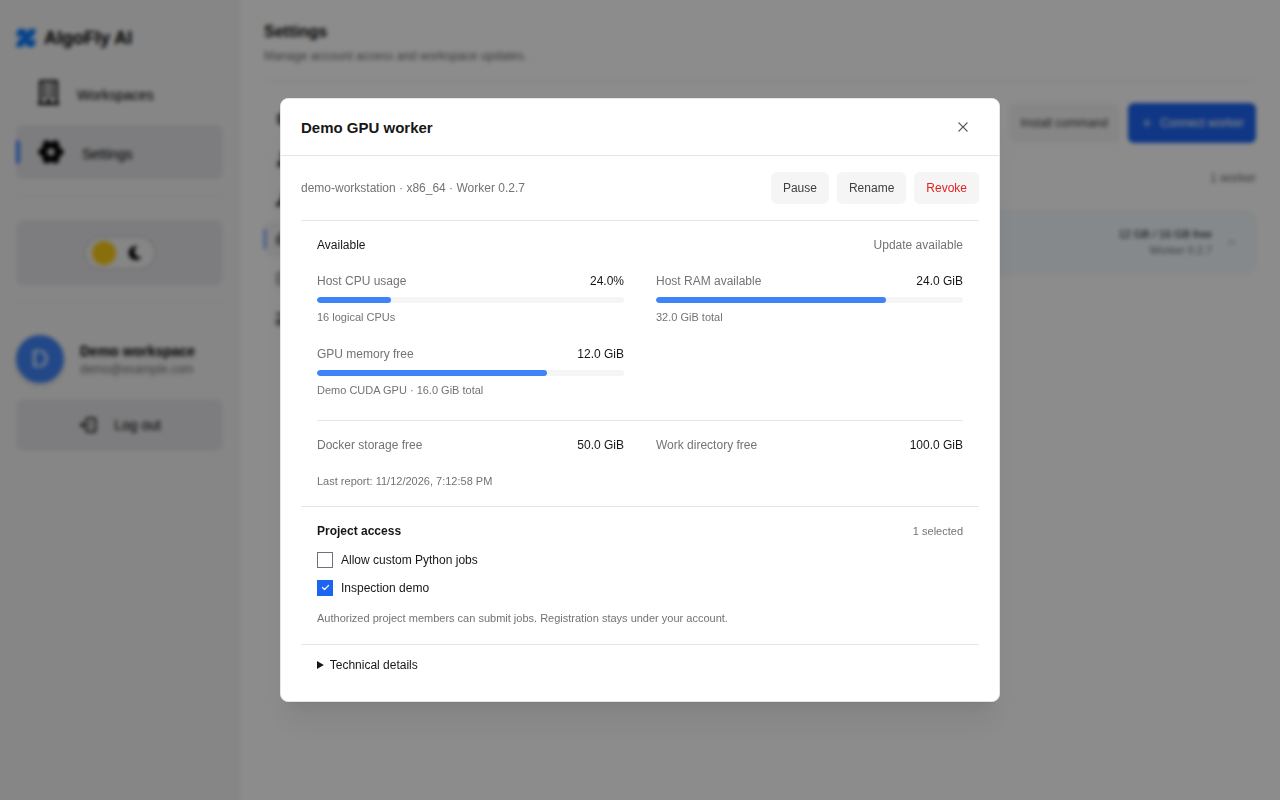
Demo data · Sample worker records, not a measurement of your machine.
CPU and RAM reservations describe admitted container limits, not current utilization. GPU memory and disk readings are observations with their own freshness and filesystem scope. Unknown values should remain unknown.
Do not add free-space values from separate filesystems or assume a Docker observation describes the dataset working directory. Resource assessment is advisory; runtime admission and safety checks remain authoritative for starting work.
Pause or remove a worker
Daily operation
Use the worker's claim-pause control when you want the machine to stop taking new jobs. Keep persistent working data available while a job is paused or delivering results. When updating an installation, select the same intended worker instance rather than registering duplicates.
Pausing job claiming prevents new assignments; it does not promise to stop an existing run. Use the run's supported pause or cancellation action for active compute.
Before uninstalling or removing persistent working data, resolve active and recovery-required runs and confirm their outputs are retained. Revoking a worker credential prevents future authorized worker access; it is not a substitute for verifying local compute has stopped.
Troubleshooting
| Symptom | Check |
|---|---|
| Worker is offline | Agent/service, outbound gateway connection, and credential |
| Online worker does not take a run | Claim pause, sharing, recipe support, device fit, and concurrency |
| Environment preparation waits | Image availability and space in the relevant storage domains |
| Hardware value is unknown | Whether that filesystem or device can be observed |
| Compute finished but delivery waits | The run's current storage/network recovery message |
Keep the original run and working data while investigating so recovery can continue without duplicate compute.